Stinkerbott 2.0 is Now Live!
Stinkerbott 2.0 is now live on Twitch! Read about the local, ethical Kokoro voices, WinUI 3 development, custom audio tag effects, and the visual melody editor.
- abdldavid
- 6 min read
Hello everyone,
If you are reading this it means Stinkerbott 2.0 is now live on Twitch! I wanted to share some details regarding its development and the specific tags you can use.
Technology Stack
My primary goals for this new TTS system were two important points: it needed to run locally on a PC and utilize an ethical language model, which can be difficult to find amidst the current surge of AI generative models. I spent several hours researching different possible combinations that wouldn’t use stolen media for their training.
- eSpeak NG: The engine and model for the text-to-speech functionality are built on eSpeak NG, a compact, open-source synthesizer that employs a formant synthesis method.
- Kokoro-Sharp: To manage the logic for interfacing with the voice model, I integrated the Kokoro-Sharp NuGet package. This helped me save development time that I rarely have lately due to my disabilities. It also made it possible to run the model locally without needing to have connection to the internet.
I specifically selected the Kokoro model for the voices. My research confirmed that Kokoro is trained exclusively on permissive and non-copyrighted audio data, including:
- Public domain audio
- Audio licensed under Apache, MIT, and similar permissive licenses
The confirmation of the fair use of data and the proper license meant I was ready to start developing the program. Most importantly, they didn’t use any stolen data.
Framework & UI Journey
The application was developed using Visual Studio 2026, leveraging the latest IDE features and the WinUI 3 library. However, the UI visualizer remained inaccessible, despite Microsoft’s documentation indicating its availability (as always, Microslop is called like that for a reason).
Initially, I opted for WPF for the UI development; however, achieving a native Windows 11 aesthetic proved problematic with that framework (the only theme and components that are found on the system were no longer available). Consequently, I chose to rebuild the project from the ground up using WinUI 3, using the WinUI 3 Gallery from the Microsoft Store as a reference for the various components (and also as my main copy/paste source! 😅).
Twitch Integration
Of course, the TTS would be meaningless if I didn’t connect it to Twitch. To integrate the system with Twitch, I utilized the Twitch Helix API (and before making the program widely available I need to change how I handle the requests, I still have the token hardcoded. I know, I know, you shouldn’t do that).
Ensuring everything functioned correctly required extensive documentation review, a long documentation that felt more like a mountain than a proper documentation. The difficult part was adding the custom rewards functionality, since I couldn’t test it on my own since I don’t have an affiliate account.
Tags
I wanted to ensure the TTS was highly personalizable, so I focused on implementing specific tags to tweak the vocal output. To handle this, I integrated a regex system that triggers various methods designed to adjust the WAV output.
[!TIP] You can find all available tags here: jakey.space/tts/
Below are some of the key custom effects and their technical explanations:
[reverse] REVERSE EFFECT (Temporal Phase Inversion)
/*
 * REVERSE EFFECT (Temporal Phase Inversion)
 * -----------------------------------------
 * Theory: 16-bit Mono PCM audio consists of a sequence of "samples."
 * Each sample occupies 2 bytes (Little-Endian format).
 *
 * Technical Note: You cannot simply reverse the raw byte array (byte[]). Doing so
 * would flip the internal byte order of each 16-bit sample, destroying the amplitude
 * data and resulting in digital noise (static).
 *
 * Implementation: We iterate through the data in 2-byte blocks. We move block 'i'
 * to position (Total - 1 - i), ensuring each individual sample's integrity is preserved.
 */
[robot] ROBOT EFFECT (Ring Modulation)
/*
 * ROBOT EFFECT (Ring Modulation)
 * ------------------------------
 * Theory: Multiply the audio signal (carrier) by a low-frequency sine wave
 * (modulator, typically between 30Hz and 60Hz).
 * https://en.wikipedia.org/wiki/Ring_modulation
 * Technical Note: In the frequency domain, this creates "sidebands" (the sum and
 * difference of the carrier and modulator frequencies). This results in a non-harmonic,
 * metallic timbre that "dehumanizes" the voice by shifting its natural formants.
 *
 * Implementation: Bytes are converted to 16-bit integers (shorts), multiplied by
 * a Sin() value relative to the sample's timestamp, and converted back to bytes.
 */
[echo] ECHO EFFECT
/*
 * ECHO EFFECT (Feedback Delay Line)
 * ---------------------------------
 * Theory: Echo is produced by adding a version of the signal that occurred in the
 * past (delay) to the current signal, attenuated by a gain factor (decay).
 * https://music.arts.lucid-bardeen/delay-effect-feedback
 *
 * Technical Note:
 * 1. Buffer Expansion: The resulting audio must be longer than the original
 *    to accommodate the "echo tail" after the speech ends.
 * 2. Mixing: We sum the original sample with the delayed sample.
 * 3. Clamping: Summing two signals can exceed 16-bit limits (-32768 to 32767).
 *    We use Math.Clamp to prevent digital clipping (distortion).
 */
Melodies
I think everyone who has played or seen gameplay of the New Tomodachi Life can agree that the TTS and voice options are funny. That’s when my brain decided that my program needed to add a melody option. In my opinion, I think it is the coolest option I could add.
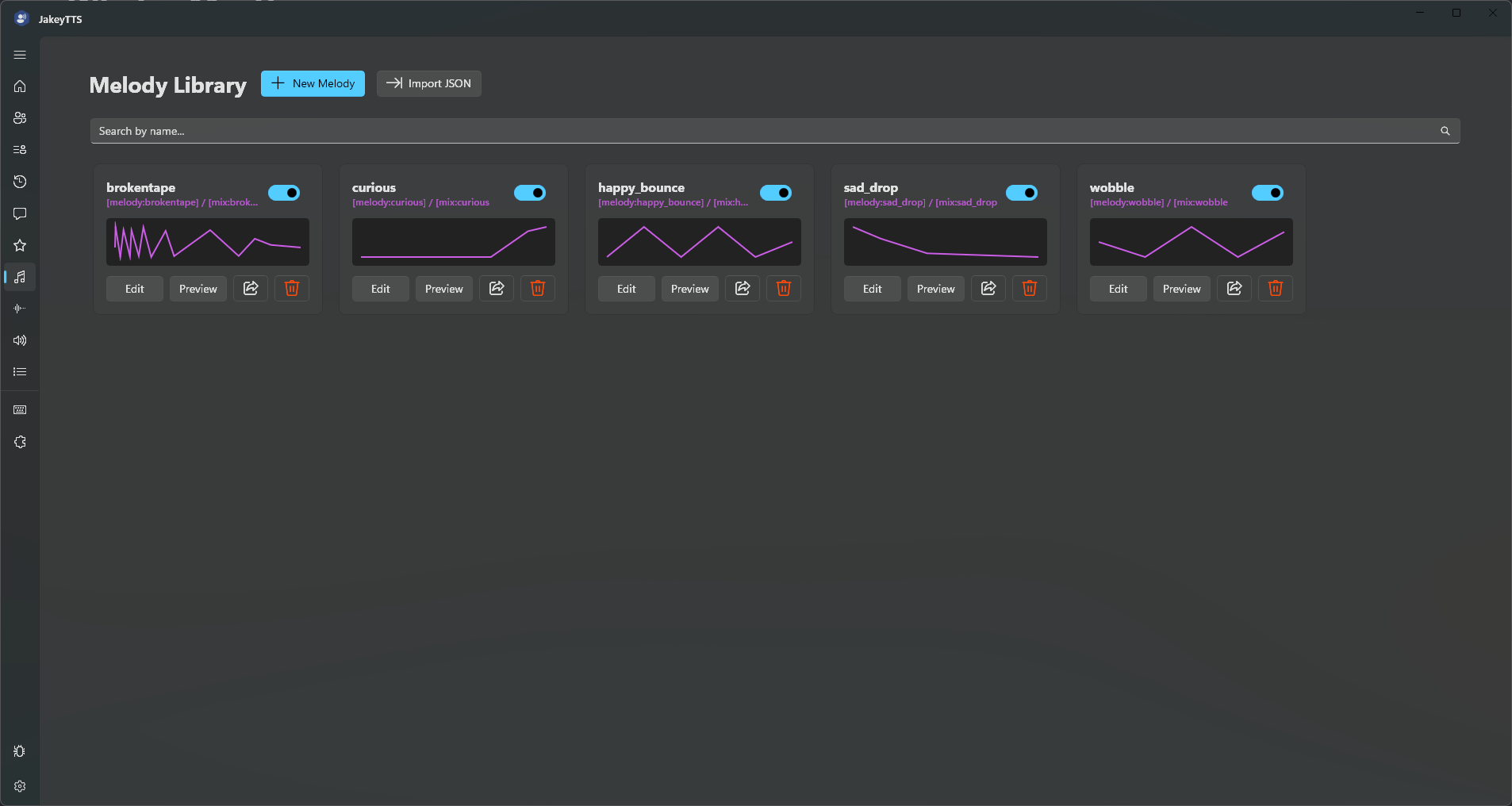 (The visual melodies library interface)
To make melodies easier to use, I decided to add a visual editor:
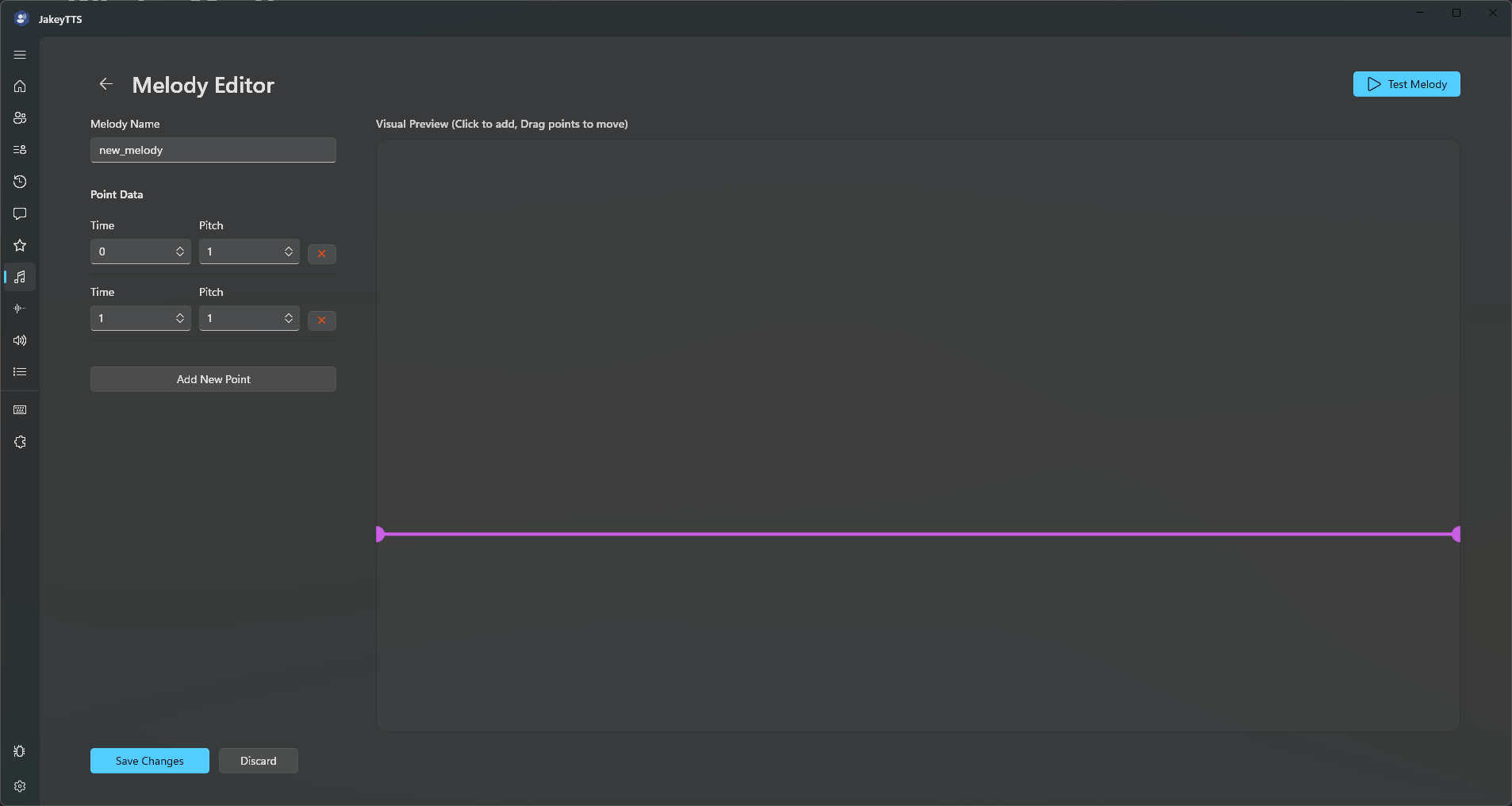 (The visual graph editor canvas for designing pitch curves)
You might be wondering how it works, and it is really easy. I apply the pitch value throughout the WAV timeline making the audio have a distinctive melody. If you are like me, you might be asking how no one thought about it before, and it is as simple as having the right inspiration—mine was Tomodachi Life.
The Future of TTS
As you might know from the stream, I plan to release the program on my Ko-fi page. This will help me support the development and my daily life since I can’t work or get paid for the little work I do.
This is also my way to offer something back to the community that helped me feel welcome and not strange about my own needs and feelings, being able to learn to love myself.
I will keep working on the project to add more cool features, but the development will be slower for several reasons:
- Reduced Mobility: Although I have a brain that can’t stop thinking about new tools, apps, and programs, I suffer from a neuromuscular disease that makes me feel tired and limits my mobility throughout the day, requiring me to use a powered wheelchair to go outside.
- Hardware Constraints: My PC is running on a 10-year-old system with 16GB DDR4 RAM that is starting to struggle, and my CPU has trouble running modern IDEs. Unfortunately, I can’t afford to upgrade it right now.
System Requirements
JakeyTTS only needs 700 MB of space to install (with a download size of about 500 MB). The CPU usage is minimal when the model is not running; when it does process speech, it only uses a small burst of CPU resources upon launching, making it perfect for running on your stream PC without performance issues.
| Requirement | Minimum | Recommended |
|---|---|---|
| Operating System | Windows 10 x64 (Build 19041 or higher) | Windows 11 x64 |
| Architecture | 64-bit (x64) | 64-bit (x64) |
| Runtime | .NET 8.0 Runtime | .NET 8.0 SDK / Runtime |
| Disk Space | 700 MB available space | 700 MB available space |
I want to thank everyone who showed up on the stream—it made me so happy seeing how everyone was having fun with the new toy! 🥹
I don’t have words to express how much it means to me.
Thank you,
David