
Pronunciation Dictionary
The Pronunciation Dictionary allows you to customize how the JakeyTTS engine pronounces specific words, abbreviations, internet slang, or text patterns. This is ideal for correcting mispronounced words, expanding short chat acronyms (like mapping idk to I don't know), or filtering unwanted characters before they are passed to the TTS voice pipeline.
1. How the Dictionary Works
Before any text segment is sent to the Kokoro TTS voice engine, it passes through the Pronunciation Dictionary processor:
- The engine checks the active rules list from top to bottom.
- If a segment of text matches a defined pattern, it replaces that segment with your custom pronunciation string.
- This pre-processed text is then narrated by the active voice.
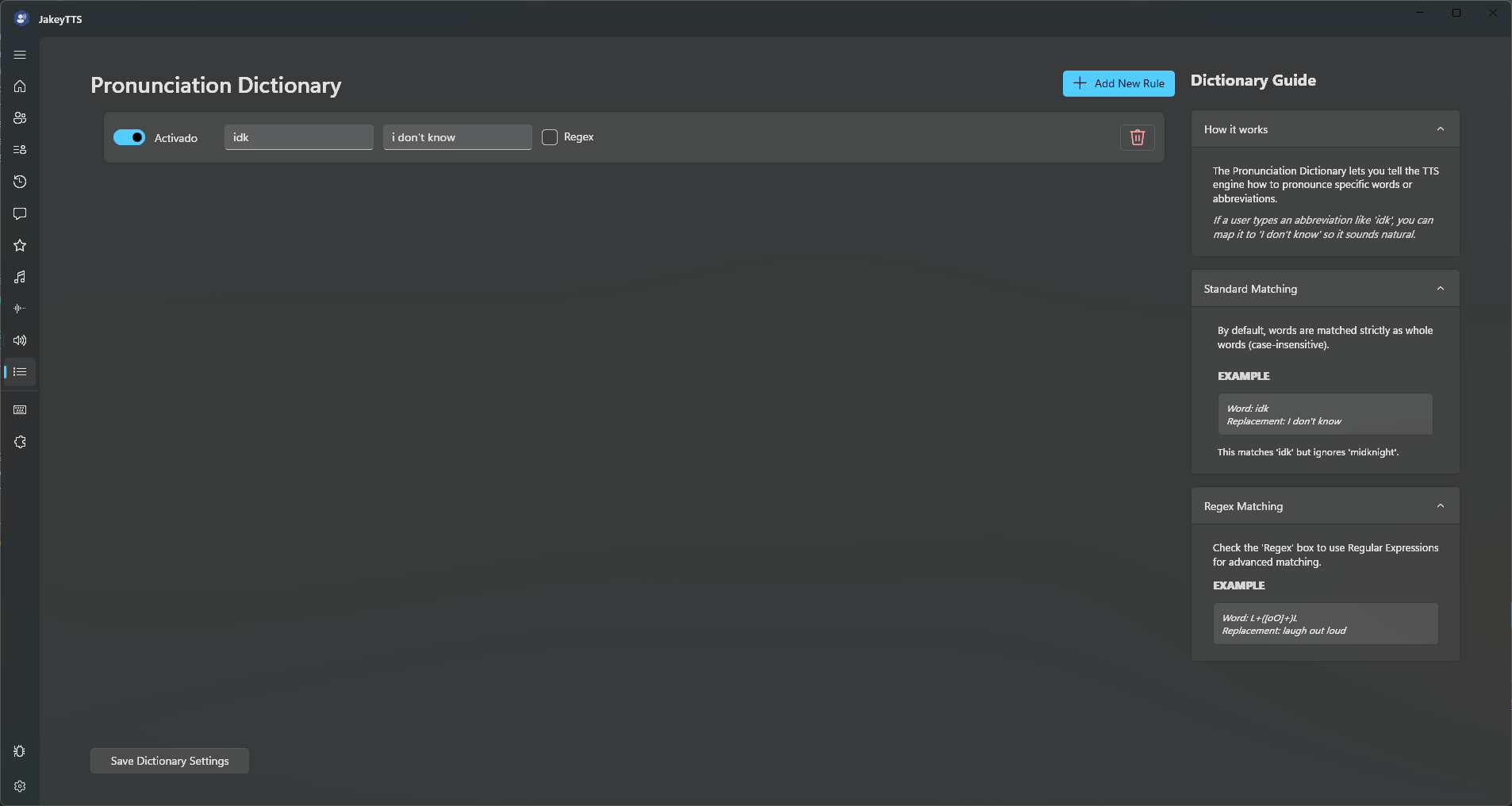 (The Pronunciation Dictionary manager displaying replacement rules and the matching guides.)
Rule Options & Columns
- IsEnabled Toggle (Switch): Instantly enable or disable a rule. When disabled, the TTS engine will ignore this mapping.
- Word Input: The text string or regular expression pattern you want the engine to search for.
- Replacement Input: The text you want the engine to read in place of the matched pattern. Leave this empty to mute or delete the word from the speech entirely.
- Regex Checkbox: Toggle between standard matching and advanced Regular Expressions (Regex) mode.
- Delete Button (Trash Icon): Click to permanently remove a rule from your dictionary.
- Add New Rule Button: Places a blank template rule at the bottom of the list.
- Save Dictionary Settings Button: Saves all active configurations to the local database.
2. Standard Word Matching
By default (with the Regex box unchecked), patterns are matched strictly as whole words and are case-insensitive.
Standard matching wraps your word pattern with word boundary tags (\b). This ensures that replacements are precise and do not accidentally mangle larger words containing the search pattern.
- Example Mapping:
- Word to match:
idk - Pronounce as:
I don't know
- Word to match:
- Speech Results:
- “idk what happened” → Spoken as “I don’t know what happened”
- “The midknight player” → Spoken as “The midknight player” (no replacement triggered because
idkis insidemidknight).
3. Regular Expression (Regex) Matching
Checking the Regex box activates advanced pattern matching. This allows you to match complex string structures, repeated characters, emoji sets, or format groups.
Example: Repeated Characters
- Pattern to match:
L+([oO]+)L(matcheslol,LOL,loool,Loooool, etc.) - Pronounce as:
laugh out loud - Speech Results: “that was so funny Loooool” → Spoken as “that was so funny laugh out loud”
- Pattern to match:
Example: Text Cleansing (Removing specific symbols)
- Pattern to match:
[~@#$%^&*] - Pronounce as: (leave empty)
- Speech Results: “Hello #streamer!” → Spoken as “Hello streamer!”
- Pattern to match:
4. Settings Storage
All dictionary rules are saved directly inside the primary client configuration file located at AppData/Local/JakeyTTS/config.json, making it easy to backup or sync across different computers.