
Speech & Scripting Tags
JakeyTTS provides a powerful inline tag system that allows streamers and users to dynamically modify synthesized speech in real-time. By inserting tags directly into Twitch commands, custom rewards, or chat replies, you can script random responses, apply audio effects, change speed, alter pitch, and introduce timed pauses.
1. Dynamic Scripting (Variables & Randomizers)
Dynamic scripting tags allow you to personalize responses based on the message context or add variety to your automated replies by introducing random numbers or choices.
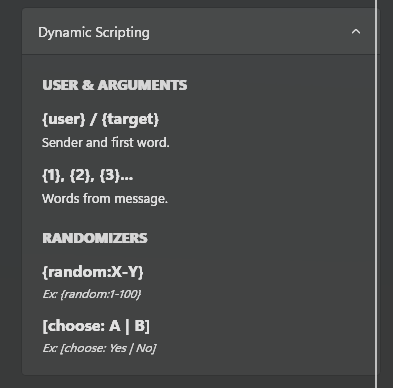 (The Dynamic Scripting tag configuration reference panel.)
User & Message Variables
These tags are replaced at runtime with details from the Twitch chat message or channel point redemption that triggered the event:
{user}: Evaluates to the display name of the Twitch user who sent the message or redeemed the channel points (e.g., Jakey).{target}:- For Commands: Evaluates to the first word following the command in the chat message. Often used to “target” another user (e.g., in a
!hug {target}command). - For Redeems: Evaluates to the exact name of the Channel Point Redeem itself.
- For Commands: Evaluates to the first word following the command in the chat message. Often used to “target” another user (e.g., in a
{message}: Only available in Channel Point Redeems. Evaluates to the custom text message typed by the viewer when redeeming (requires “Require viewer to enter text” enabled on the Twitch Creator Dashboard).{1},{2},{3}...: References specific words in the user’s message by index.{1}is the first word,{2}is the second word, and so on.
Randomizers
Introduce variance and fun into replies with random selection tags:
{random:X-Y}: Generates a random integer betweenXandYinclusive.- Example:
{user} rolled a {random:1-100}!-> Jakey rolled a 87!
- Example:
[choose: A | B | C]: Randomly selects one of the pipe-separated options. You can include as many choices as you want.- Example:
The magic 8-ball says: [choose: Yes | No | Maybe]-> The magic 8-ball says: Yes
- Example:
2. Voice & Pitch Modulation
Use these tags to dynamically change the tone, style, and volume of the voice during narration. You can combine multiple tags to create highly unique voices.
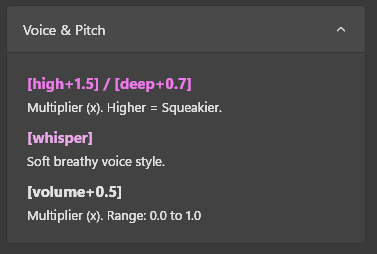 (Voice and pitch adjustment parameters.)
Pitch Multipliers
[high+X]: Shifts the pitch upward by a factor ofX. Higher multipliers make the voice sound squeakier.- Example:
[high+1.5] This voice sounds like a chipmunk!
- Example:
[deep+X]: Shifts the pitch downward by a factor ofX. Lower multipliers make the voice deeper and more resonant.- Example:
[deep+0.7] Welcome to the deep dark dungeons.
- Example:
Voice Style & Volume
[whisper]: Changes the voice style to a soft, breathy whisper.- Example:
[whisper] Shhh, please keep it quiet in chat.
- Example:
[volume+X]: Modifies the output volume for the subsequent text.Xis a multiplier between0.0and1.0.- Example:
[volume+0.3] Softly speaking, [normal] and now at full volume!
- Example:
3. Audio Effects
Add unique, immersive filters directly to the audio stream. These effects process the synthesized speech to make it sound completely different.
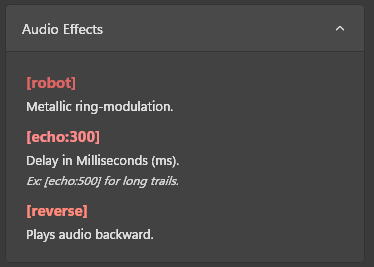 (The digital signal processing (DSP) audio effects options.)
[robot]: Applies a metallic ring-modulation filter, giving the voice an artificial, robotic tone.- Example:
[robot] Affirmative. System diagnostics are complete.
- Example:
[echo:X]: Adds a feedback echo effect, whereXis the delay in milliseconds. Use higher values for spaced-out, long trails.- Example:
[echo:300] Hello? Is anyone there? [echo:500] Echo...
- Example:
[reverse]: Reverses the audio stream, playing the synthesized speech completely backward.- Example:
[reverse] This is a secret message.
- Example:
4. Timing & Speed
Control the pacing, speed, and rhythm of the speech. Pauses are essential for making TTS sound natural or for dramatic comedic timing.
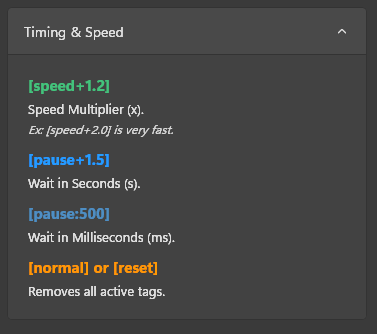 (Speech speed multipliers, pauses, and reset options.)
[speed+X]: Multiplies the speed of the speech byX.- Example:
[speed+1.2] Fast pacing, [speed+2.0] and now this is super fast speech!
- Example:
[pause+X]: Inserts a silent pause lastingXseconds.- Example:
Ready... [pause+1.5] Set... [pause+1.5] Go!
- Example:
[pause:X]: Inserts a silent pause lastingXmilliseconds.- Example:
This is a short [pause:500] half-second break.
- Example:
[normal]or[reset]: Clears all active voice, pitch, audio effect, and speed tags, restoring the speech profile back to your default settings.- Example:
[robot][speed+1.5] Robotic rush [reset] and now we are back to normal.
- Example: